How To Auto-Generate Ionic iOS App Logo & Splash Screen

Icon Source Image

Save an icon.png, icon.psd or icon.ai file within the resources directory at the root of the Cordova project. The icon image’s minimum dimensions should be 192×192 px, and should have no rounded corners. Note that each platform will apply it’s own mask and effects to the icons.

For example, iOS will automatically apply it’s custom rounded corners, so the source file should not already come with rounded corners.

What I do here is replace the icon.png in resources folder with a new 1024×1024 PNG file. And then run the following command:

$ ionic resources --icon

Splash Screen Source Image

Save a splash.png, splash.psd or splash.ai file within the resources directory at the root of the Cordova project. Splash screen dimensions vary for each platform, device and orientation, so a square source image is required the generate each of various sizes.

The source image’s minimum dimensions should be 2208×2208 px, and its artwork should be centered within the square, knowing that each generated image will be center cropped into landscape and portrait images.

The splash screen’s artwork should roughly fit within a center square 1200x1200px.

What I do here is replace the splash.png in resources folder with a new 2208×2208 PNG file. And then run the following command:

$ ionic resources --splash

This will generate all the needed icons and splash screens for all your targeted devices.

Generating Icons and Splash Screens

To generate both icons and splash screens, follow the instructions above and run:

$ ionic resources

Source: Ionic Docs

Google Announces Familiar Looking Google Pixel Phone

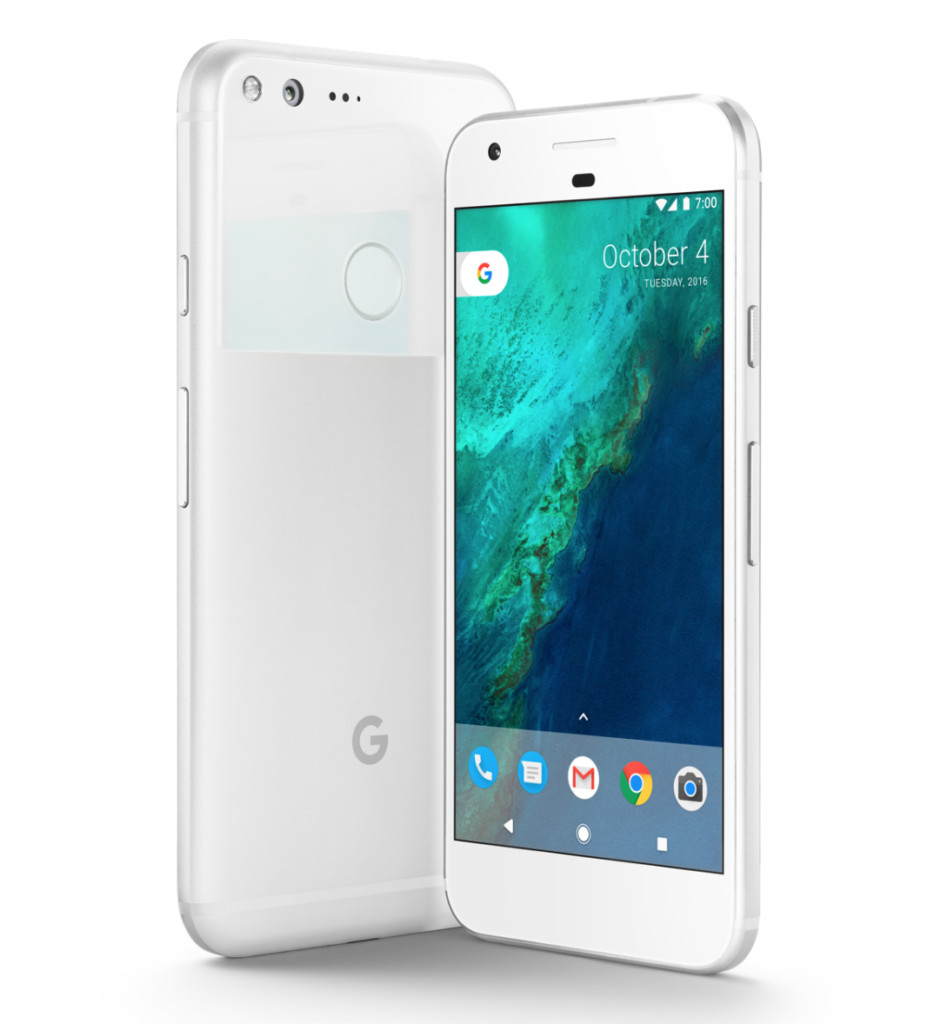
Google Pixel Phone via Google

With Pixel, we obsessed over every detail, from the industrial design to the user experience. We carefully sculpted the surfaces of the phone, and rounded the edges to make it easy to grip. We used 2.5D Corning® Gorilla® Glass 4 on the front display and back glass to accent the aerospace grade aluminum body.

The glass on the back also features Pixel Imprint, our fingerprint sensor, which is placed on the back of the phone where your finger expects it. You can even swipe it to access your notifications. And no matter what you’re using your phone for, you’ll need a battery that lasts all day and charges fast — up to seven hours in 15 minutes.

Pixel is available for pre-order today starting at $649 in the U.S., U.K., Canada, Germany and Australia. Pre-orders in India will begin October 13. In the U.S., we’re teaming up exclusively with Verizon to make Pixel available nationwide at all Verizon retail outlets, including Best Buy stores. We’re also offering Pixel unlocked on the Google Store and, for you Project Fi fans out there, you’ll be happy to know that Pixel is the latest device to work on the Fi network.

google pixel phone

Sold by Google, Built by HTC, Designed by Apple.

Angular ng-show in ng-repeat not working in Ionic

The official Angular Docs Page for ng-show does not explain how to use this within a repeater.

The ngShow directive shows or hides the given HTML element based on the expression provided to the ngShow attribute. The element is shown or hidden by removing or adding the .ng-hide CSS class onto the element. The .ng-hide CSS class is predefined in AngularJS and sets the display style to none (using an !important flag).

The common mistake when using ng-show in repeater (ng-repeat) is the usage of angular brackets {{}}

  1. This example won’t work if the div is in a repeater:

<div ng-show="{{value == othervalue}}">

Use This Instead:

<div ng-show="value == othervalue">

Usually the app won’t complain and there won’t be any errors in the console, which makes debugging this edge case so difficult.

Facebook Brings Back The MarketPlace

Cyrus Farivar writing for ArsTechnica

Facebook has begun rolling out its “Marketplace” feature to users, allowing people to buy and sell items locally through the app.

Marketplace has existed for some time as part of Facebook Groups. (I’ve bought and sold some items through a local parents’ group for the last few years, and it works well.) Delivery and payment is handled separately from the app, just like similar ads posted on Craigslist.

The company said in a Monday press release that the feature would be “rolling out to everyone over 18 years old in the US, UK, Australia, and New Zealand on the Facebook app for iPhone and Android.”

The new “shop” button will replace in-app real estate currently occupied by Messenger, Facebook’s standalone messaging app. On Sunday, the company rolled out “Messenger Lite,” a stripped-down version released to users in Kenya, Tunisia, Malaysia, Sri Lanka, and Venezuela, with more countries coming soon.

Facebook had a marketplace early on it’s life (almost 10 years ago), but decided to get rid of it.

From Wikipedia:

Marketplace

On May 14, 2007, Facebook launched Marketplace, which lets users post free classified ads.[196] Marketplace has been compared to Craigslist by CNET, which points out that the major difference between the two is that listings posted by a user on Marketplace are seen only by users in the same network as that user, whereas listings posted on Craigslist can be seen by anyone.[197]

If they would have kept it in 2007 I think Craigslist would never come to exist.

The Microsoft Wearable Band is DEAD

Juli Clover writing for MacRumors:

The Microsoft Band, the wearable device Microsoft first introduced in late 2014, is being quietly phased out of existence. As of today, Microsoft has removed all Microsoft Band models from the Microsoft Online Store and has eliminated the Band Software Development Kit.

Following the Microsoft Band’s 2014 release, Microsoft continued development on the device and released a second-generation model in October of 2015. Priced at $250, the second-generation Microsoft Band featured an optical heart rate monitor for measuring heart rate, an accelerometer and gyroscope for measuring movement, GPS, skin temperature sensors, and more.

It received poor reviews for its price point, design, battery life, and lack of utility, and despite Microsoft’s efforts to push sales with an Apple Watch trade-in program, the Microsoft Band 2 failed to catch on.

Previous information shared by ZDNet has suggested Microsoft disbanded the team that was working to bring Windows 10 to the Microsoft Band and has relocated some of the hardware team. Sources have also told the site that Microsoft is planning to phase out the fitness band and has no plans to work on a Band 3.

These are embarrassing times for Microsoft.

How To Use Ionic & Angular q Promises?

The Deferred API

A new instance of deferred is constructed by calling $q.defer().

The purpose of the deferred object is to expose the associated Promise instance as well as APIs that can be used for signaling the successful or unsuccessful completion, as well as the status of the task.

Methods

resolve(value) – resolves the derived promise with the value. If the value is a rejection constructed via $q.reject, the promise will be rejected instead.

reject(reason) – rejects the derived promise with the reason. This is equivalent to resolving it with a rejection constructed via $q.reject.

notify(value) – provides updates on the status of the promise’s execution. This may be called multiple times before the promise is either resolved or rejected.
Properties

promise – {Promise} – promise object associated with this deferred.

// for the purpose of this example let's assume that variables `$q` and `okToGreet`
// are available in the current lexical scope (they could have been injected or passed in).

function asyncGreet(name) {
  var deferred = $q.defer();

  setTimeout(function() {
    deferred.notify('About to greet ' + name + '.');

    if (okToGreet(name)) {
      deferred.resolve('Hello, ' + name + '!');
    } else {
      deferred.reject('Greeting ' + name + ' is not allowed.');
    }
  }, 1000);

  return deferred.promise;
}

var promise = asyncGreet('Robin Hood');
promise.then(function(greeting) {
  alert('Success: ' + greeting);
}, function(reason) {
  alert('Failed: ' + reason);
}, function(update) {
  alert('Got notification: ' + update);
});

This code example was taken from Angular Documentation page: https://docs.angularjs.org/api/ng/service/$q